 Dooing
A minimalist todo list, inside Neovim.
Dooing keeps your tasks in a clean floating window right where you work — with tags, priorities, due dates, nested subtasks and per-project lists. Free, open source, zero dependencies, and everything stays on your machine.
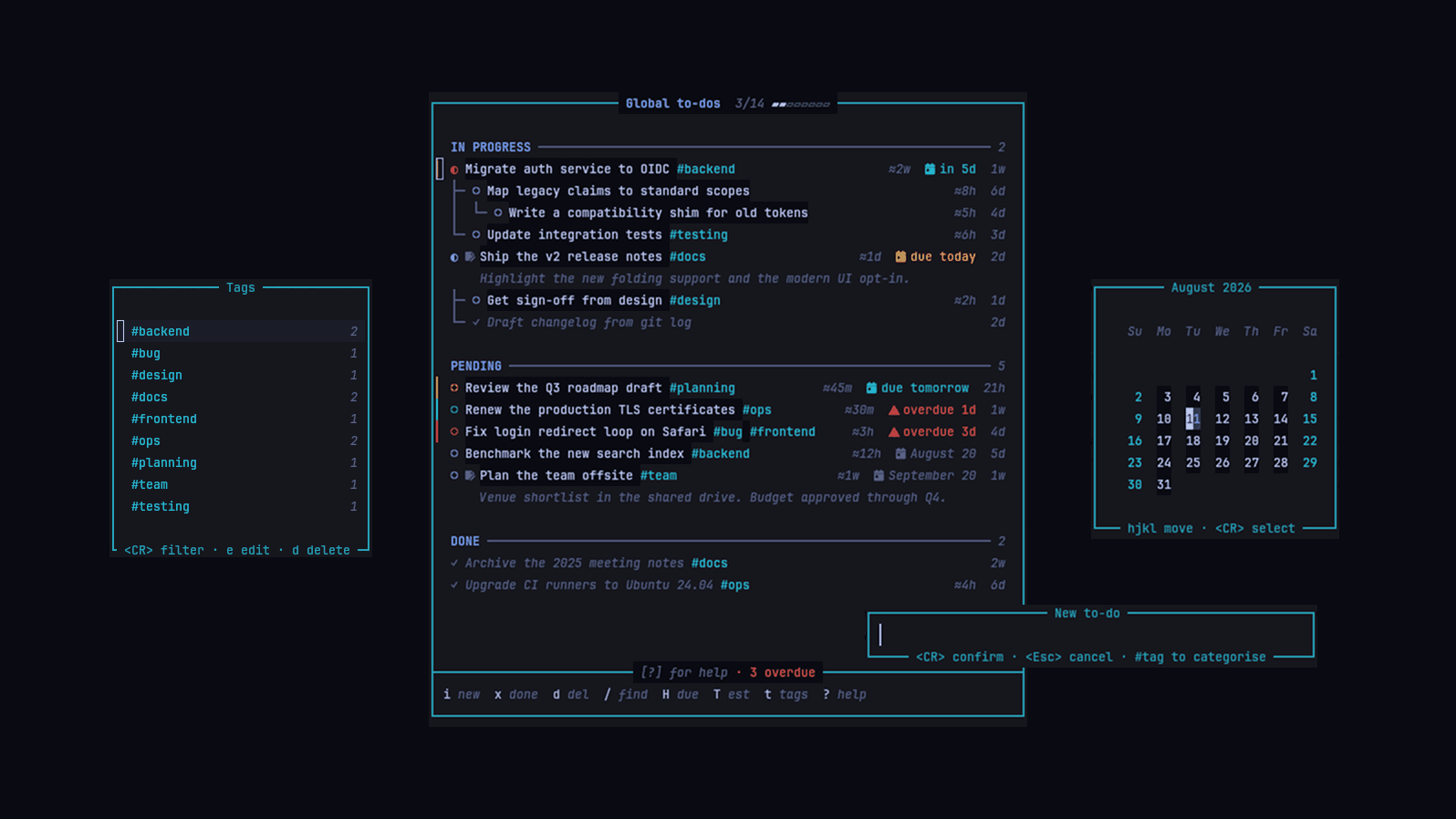
Features
- Floating window — a clean, distraction-free todo list that opens over your code and closes with a keystroke.
- #tags — categorize tasks inline; filter the list by any tag from a dedicated tags window.
- Nested subtasks — break tasks down with real nesting depth, tree guides and folding per subtree.
- Priorities — named, weighted priorities combined into color groups — fully configurable.
- Due dates — picked on a built-in calendar; overdue, due-today and due-soon each get their own accent.
- Smart notifications — a due-items summary on startup and when opening todos, plus an interactive due window.
- Per-project todos — a separate list per git repository, kept next to the code it belongs to.
- Time estimates — give a task an estimated completion time (30m, 2h, 1d, 0.5w).
- Relative timestamps — see at a glance when each todo was created (@5m ago, @2h ago).
- Notes & scratchpad — every todo has a markdown scratchpad; the first line previews under the task.
- Import / export — todos live in a plain JSON file, importable and exportable from inside the window.
- Colorscheme-friendly — every highlight group is a default link, so your colorscheme always wins.
Installation
Requires Neovim ≥ 0.10.0. No external dependencies.
lazy.nvim
return {
    "atiladefreitas/dooing",
    config = function()
        require("dooing").setup({
            -- your custom config here (optional)
        })
    end,
}
vim.pack (built-in, Neovim ≥ 0.12)
vim.pack.add({ "https://github.com/atiladefreitas/dooing" })

require("dooing").setup({
    -- your custom config here (optional)
})
Usage
- Open your todos with
<leader>td(or:Dooing) - Press
iand type a task — add#tagsinline to categorize it - Give it a due date with
H(a calendar opens), an estimate withT(30m,2h,1d,0.5w), priorities withp - Break it down with
<leader>tn— subtasks nest, fold and move with their parent - Toggle it done with
x; sweep completed tasks withD - Filter by tag with
t, search with/, and jump to everything due with<leader>tN
Classic or modern UI
Dooing ships two interfaces. The default classic style is byte-for-byte what it always was, so updating never changes your setup. The redesigned modern style is one line away:
require("dooing").setup({
    ui = { style = "modern" },
})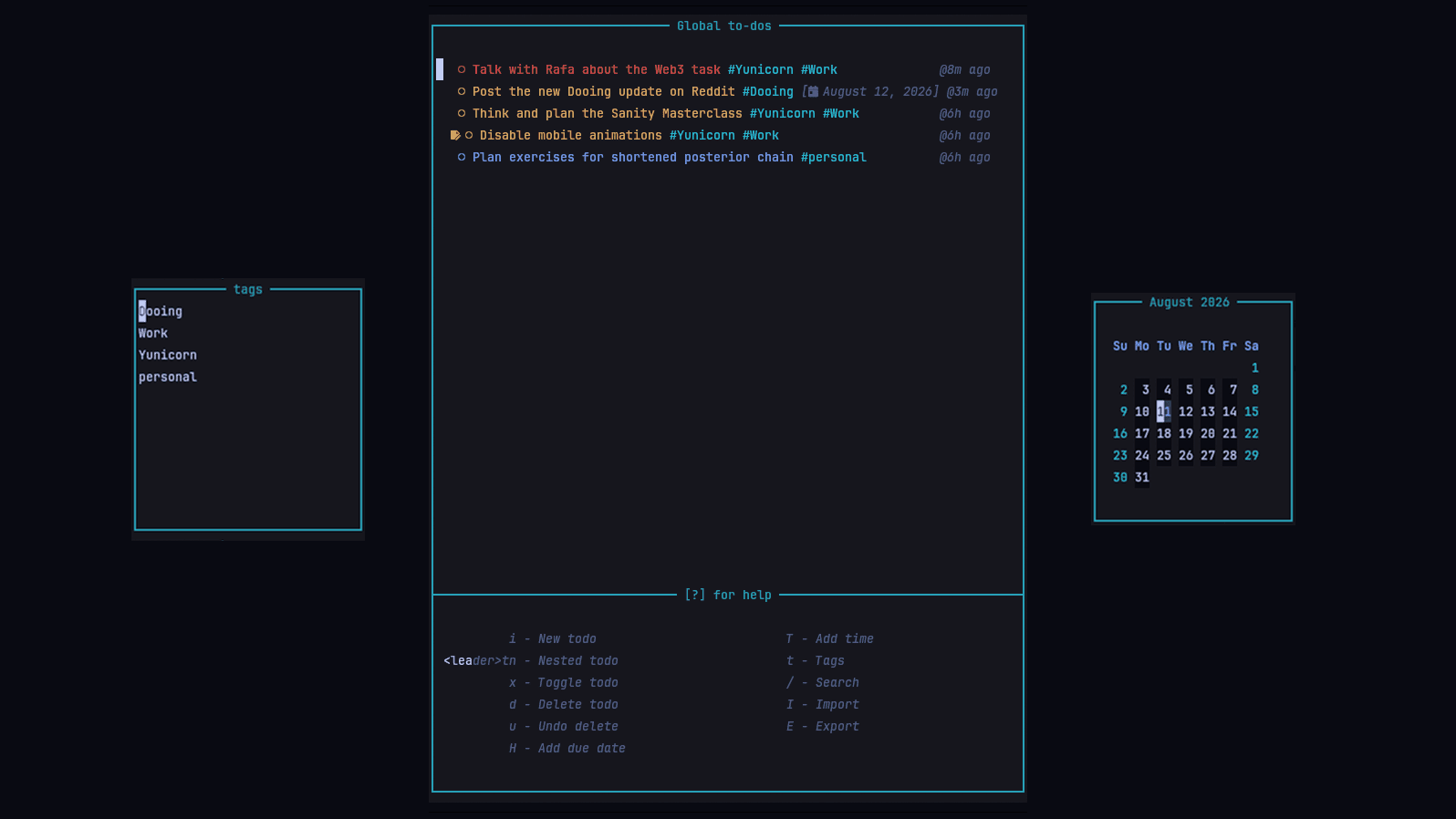
- Status sections — todos grouped under IN PROGRESS / PENDING / DONE with counts, subtasks staying with their parent.
- Priority as a marker — only the
▎marker and status icon carry the priority color. - Right-aligned metadata — estimate, due date and age, dimmed, dropping to their own line only when squeezed.
- Tree connectors and folding —
zcon a parent collapses exactly its subtree. - Sharper due dates —
overdue 3d,due today,in 5d, each with its own accent. - Progress in the chrome — a completion bar in the title, overdue count in the footer.
Every piece has its own toggle under ui:
require("dooing").setup({
    -- every piece has its own toggle — mix and match
    ui = { style = "modern", tree_connectors = false },
})
Keybindings
Main window
| <leader>td | Toggle global todo window |
| <leader>tD | Toggle project todo window |
| <leader>tN | Show due items window |
| i | Add new todo |
| <leader>tn | Create nested subtask |
| x | Toggle todo status |
| d | Delete current todo |
| D | Delete all completed todos |
| H | Add due date |
| r | Remove due date |
| T | Add time estimation |
| R | Remove time estimation |
| e | Edit todo |
| p | Edit priorities |
| u | Undo delete |
| / | Search todos |
| t | Toggle tags window |
| c | Clear active tag filter |
| I | Import todos |
| E | Export todos |
| <leader>D | Remove duplicates |
| <leader>p | Open todo scratchpad |
| f | Refresh todo list |
| ? | Toggle help window |
| q | Close window |
Tags window
| <CR> | Filter by tag |
| e | Edit tag |
| d | Delete tag |
| q | Close window |
Calendar window
| h / l | Previous / next day |
| k / j | Previous / next week |
| H / L | Previous / next month |
| <CR> | Select date |
| q | Close calendar |
Every keymap is remappable via setup().
Commands
| :Dooing | Open the global todo window |
| :DooingLocal | Open the project todo window (git repositories only) |
| :DooingDue | Window with every due and overdue item |
| :Dooing add [text] | Add a task; -p/--priorities takes a comma-separated list |
| :Dooing list | List all todos with indices and metadata |
| :Dooing set [i] [field] [value] | Set priorities or ect on a todo by index |
Configuration
Everything is configured through a single setup(opts) call, merged over sensible defaults. The most useful options:
require("dooing").setup({
    -- Where global todos are persisted
    save_path = vim.fn.stdpath("data") .. "/dooing_todos.json",

    -- Interface style: "classic" (default) | "modern"
    ui = { style = "classic" },

    -- Show relative timestamps (@5m ago, @2h ago)
    timestamp = { enabled = true },

    -- The floating window
    window = {
        dimensions = { width = 55, height = 20 },
        border = "rounded",     -- "single" | "double" | "rounded" | "solid"
        position = "center",    -- also corners, "left", "right", "top", "bottom"
    },

    -- Project-specific todos, detected via git
    per_project = {
        enabled = true,
        default_filename = "dooing.json",
        auto_gitignore = false,     -- true | false | "prompt"
        on_missing = "prompt",      -- "prompt" | "auto_create"
        auto_open_project_todos = false,
    },

    -- Nested subtasks
    nested_tasks = {
        enabled = true,
        indent = 2,
        retain_structure_on_complete = true,
        move_completed_to_end = true,
        inherit_priority = false,
    },

    -- Due date notifications
    due_notifications = {
        enabled = true,
        on_startup = true,
        on_open = true,
    },

    -- The date picker
    calendar = {
        language = "en",
        start_day = "sunday",   -- or "monday"
    },

    -- Named priorities and how they combine into colors
    priorities = {
        { name = "important", weight = 4 },
        { name = "urgent", weight = 2 },
    },
    priority_groups = {
        high = { members = { "important", "urgent" }, hl_group = "DiagnosticError" },
        medium = { members = { "important" }, hl_group = "DiagnosticWarn" },
        low = { members = { "urgent" }, hl_group = "DiagnosticInfo" },
    },
})
Adaptive window size
window.dimensions also accepts a function, evaluated every time the window opens, so it can track the current editor size. Values are floored and clamped to the space available.
require("dooing").setup({
    window = {
        dimensions = function()
            return {
                width = math.max(40, math.floor(vim.o.columns * 0.4)),
                height = math.max(10, math.floor(vim.o.lines * 0.6)),
            }
        end,
    },
})
Highlight groups
Every group (DooingPending, DooingDone, DooingTag, DooingOverdue, the sections, the tree guides…) is defined as a default link, so a colorscheme or your own config always wins:
vim.api.nvim_set_hl(0, "DooingSectionTitle", { fg = "#7fddff", bold = true })
vim.api.nvim_set_hl(0, "DooingOverdue", { fg = "#f38ba8" })
Per-project todos
Alongside your global list, Dooing keeps a separate todo file per git repository. Press <leader>tD inside a repo: if a project file exists it loads, otherwise Dooing offers to create one (with an optional custom filename, and optionally added to .gitignore). Project and global todos are completely separate — switch between them anytime with the two keymaps.
Due date notifications
Dooing checks for due items when Neovim starts — project todos when you’re in a repo with a todo file, global todos otherwise — and again whenever you open a todo window. <leader>tN (or :DooingDue) opens an interactive window with every due and overdue item; <CR> jumps straight to the todo. Each part is a switch: enabled, on_startup, on_open.
Works with Bloocky
If you also use Bloocky, the timeblocking calendar for Neovim, your Dooing todos with a due date show up on the calendar on their due day — read-only, with time estimates and priorities, and overdue items highlighted.